
How to fix error code 18 on Google Play Store (Nothing else worked)
What is error code 18? What are the reasons for it to occur? How to fix it?
This error is accompanied by the following note:
Can't install app.
App can't be installed. Try again, and if the problem continues, get help troubleshooting (Error code: 18).
Error 18 appears when the Google Play Store app cannot install an app, or apps. It can occur on any smartphone and tablet running on any version of the Android operating system, including Samsung, Huawei, Xiaomi, Sony, OnePlus, and many other devices.
The reasons why this error occurs are:
- The microSD card (provided that you use one);
- Outdated operating system;
- Outdated Google Play app;
- Corrupt update files of the Google Play app;
- Unstable Internet connection;
- Corrupt cached files and app data.
The solutions below are created based on thorough research, and include the feedback of experts and users who had this error and managed to solve it. Feel free to check them out and follow them carefully.
-
Wipe the cache partition
0(0)0(0)Every Android smartphone or tablet running on Android OS has a secret menu. This menu holds options that can help you regain access if you forgot the system password, if the operating system is stuck on the logo, if the operating system won't load. Among these options, there is an option to wipe the cache partition, which holds the key to fixing this error. Wiping the cache partition will wipe all the corrupt files on your device and replace them with their clean alternatives.
In order to access the recovery mode and wipe the cache partition, follow these steps:
- Power off the device. If you can't do that using the power button, just remove the battery and insert it after 10 seconds.
- Press and hold the Volume (+) up and the Power (Sleep/Wake) buttons. Once your device turns on, let go of the buttons.
* If you use a Samsung device, press the Power (Sleep/Wake), Volume (+) up and Home button. - Press the Volume up or Volume down key to navigate through the options. Highlight the Wipe cache partition then press the Power (Sleep/Wake) key to make the selection.
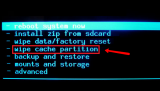
More infos
- Power off the device. If you can't do that using the power button, just remove the battery and insert it after 10 seconds.
-
Reinstall all the updates of the Google Play Store app
0(0)0(0)Maybe the latest version of the Google Play Store app is the cause of the error code 18, possibly because it was downloaded and installed improperly.
Revert the Google Play Store app to the default version, by following the steps mentioned below:
- Go to Settings and select Application Manager/Apps;
- Tap on Google Play Store, click on the three-dot icon in the upper right-hand corner, and select Uninstall updates;
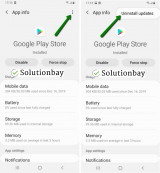
- Tap on OK to confirm;
- Open the Google Play Store app;
- Update it, if prompted.
The video guide below demonstrates how to uninstall updates:
Note: The video above was recorded on a Samsung Galaxy device, running on Android OS 8 - the steps described may slightly vary from one device to another.
More infos
-
Reset your device to the factory settings
0(0)0(0)If the other solutions didn't work, resetting your device to its factory settings may help. It will remove the corrupt system files from your device and resolve many issues along the way.
To reset your device to its factory settings, follow the steps below:
- Backup your device's data to any cloud storage service (e.g. to Google Drive, Dropbox) or to a computer;
- Go to Settings;
- Tap on Reset and tap on the factory reset option;

Feel free to watch the tutorial below, on how to reset your device (taken on a Samsung Galaxy device, running on Android 8 - the steps described may vary from one device to another):
Note: Make sure that your device is fully charged before resetting it, to avoid additional complications. Also, do make a backup of your personal files (photos, videos, music, and other documents), so that they are safely stored.
More infos
Like Solutionbay?
Also check out our other projects :) See all projects

Login to Solutionbay
Join Solutionbay
Please click on the confirmation link we just sent you to
If you don’t receive the email in the next 2 minutes please check your junk folder, and add [email protected] to your safe sender list.