
How to fix error code 101 on Google Play Store (Tablet)
What is error 101? Why is the reason for it to appear? How to fix it?
Known as App could not be downloaded due to an error 101, this error occurs when an app cannot be downloaded to your smartphone or tablet running on Android OS (e.g. Samsung, Huawei, Xiaomi, Sony, and many others).
The most common reasons behind this error are:
- Corrupt installation file;
- Unstable Internet connection;
- The Google Play Store app;
- Corrupt app data and cache files;
- Lack of free storage space;
- Issue with the operating system version.
The solutions listed below will show you how to fix this error easily, and safely. All you need to do is to follow the instructions.
-
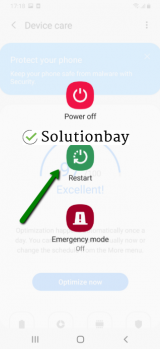
Restart your device
0(0)0(0)The operating system is a group of many processes running as one to provide you a smooth user experience. If one of those processes gets stuck, errors can occur. By restarting your device, you will restart all the processes running in the background, some of which might have become unresponsive, resulting in error 101. Turn off and turn back on your device, and try to install the app(s), again.
 More infos
-
Free up storage
0(0)0(0)Lack of free space on the internal storage or on the microSD card, may result in issues with the device's operating system, as it won't be able to work properly and even install new apps. The short-term solution is to uninstall an app you don't need and install the app you need, but the long-term one is uninstalling all the apps you don't need, as well as removing photos, videos, music.
Feel free to check the running out of disk space / no space left tips on how to free up space.
More infos
-
Connect your device to a stable Internet connection
0(0)0(0)It is possible that the Internet access point (the Wi-Fi, or mobile data) you are currently connected to is the cause of the error 101 in Google Play Store, the reason being the instability of the connection, or frequent connectivity issues.
If you are connected to a Wi-Fi network, try connecting to another Wi-Fi network or mobile data, and vice versa. Also, every time you switch from one access point to another, restart the Google Play Store app and try installing or updating the app.
You may also consider improving the stability of your Internet connection. You can do that in the following ways:
- Buy a stronger router;
- Buy a signal booster (if you live in a house);
- Position your router in a central, higher area of your house, or apartment;
- Subscribe to a different, more stable Internet provider (this should be a last-resort option).
Discover more solutions to improving the Internet connection, via the slow Internet guide.
More infos
Like Solutionbay?
Also check out our other projects :) See all projects -
Sign out from and sign back in to your Google account
0(0)0(0)The Google account that is needed to access Google apps on Android device, and configure the device itself is a vital part of the well-being of Android smartphones and tablets, because it enables you to install system updates, and app updates, too. Sometimes, although rare, the Google account which you used to activate your device may cause issues. The reason may a recent system update or an update to Google apps which tweaked files your Google account needs. To fix this error, and install or update apps through Google Play, you need to sign out from and sign back in to your Google account. To do that, follow the steps below:
- Go to Settings, and tap on Accounts and backup (or just Accounts);
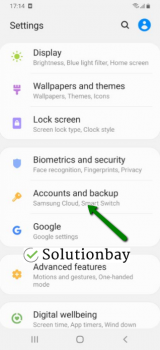
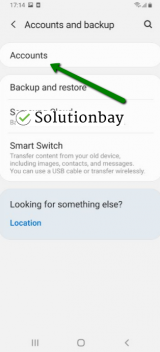
- Tap on Accounts and select Google;
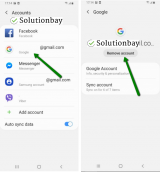
- Select the Google account you are logged in with and then tap on Remove Account;
- Restart your device;
- Sign back in the Google account.
This course of action will refresh all the files, tasks and processes related to the Google account, and the error should be resolved.
More infos
- Go to Settings, and tap on Accounts and backup (or just Accounts);
-
Clear the cache and app data files of the Google Play Store vital apps
0(0)0(0)Bad app data and cache files can be responsible for the Google Play Store error code 101, as they might have become corrupt. What you need to do here is to clear the app data and cache files of the Google Play core apps, i.e. the apps which are needed for you to be able to install all the other apps, by following these steps:
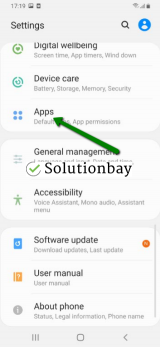
- Go to Settings > Apps/Application Manager;
- Select Apps/Applications Manager;
- Select Google Play Store from the list and tap on the clear data and clear cache buttons;
- Select Google Services Framework from the list and tap on the clear data and clear cache buttons;
- Select Google Play Service from the list and tap on the clear data and clear cache buttons;
- Select Download Manager and tap on the clear data and clear cache buttons.
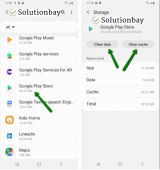
The video demo below shares how to clear app data and cache files (taken on a Samsung Galaxy device, running on Android OS 8 - the steps described may differ from one device to another):
More infos
-
Update your device's operating system to the latest version available
0(0)0(0)Updating your operating system as soon as an update is available is crucial so that your device operates at its top performance. Also, the latest update always contains bug fixes discovered in previous versions of the operating system. Check if an update is available and update your device's operating system to the latest version. Usually, updates are installed automatically, however, it's good to check manually, from time to time, if an update is available.
To update the device's operating system to the latest version, follow the steps below:
- Go to Settings;
- Tap on Software Update;
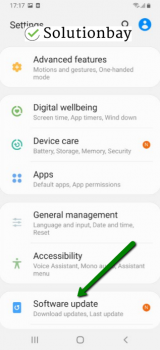
- Tap on Download and Install, if an update is available (if not, on a check for updates button).
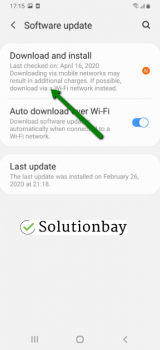
On other devices, you need to follow the steps below:
The video guide below reveals how to update your device's operating system (taken on a Samsung device, running on Android OS 8):
Note: When you update a mobile device, make sure that it won't run out of battery, to avoid damaging your device. It is safer to connect your device to the charger. Also, to avoid additional charges, update your device via Wi-Fi only.
More infos
-
Wipe the cache partition
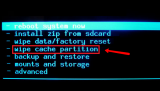
0(0)0(0)In order for a device to work faster, data needs to be cached by the operating system. If the integrity of the cached data is compromised, errors can occur. Wiping the cache partition via the recovery menu is another way to fix this error message, as the system will remove the corrupt cache, and replace it with clean files.
In order to access the recovery mode and wipe the cache partition, follow these steps:
- Turn off your device. If you can't do that using the power button, just remove the battery and insert it after 10 seconds, if your battery is removable.
- Press and hold the Volume (+) up and the Power (Sleep/Wake) buttons. Once your device turns on, let go of the buttons.
* If you use a Samsung device, press the Power (Sleep/Wake), Volume (+) up and Home button. - Press the Volume up or Volume down key to navigate through the options. Highlight the Wipe cache partition then press the Power (Sleep/Wake) key to make the selection.
More infos
- Turn off your device. If you can't do that using the power button, just remove the battery and insert it after 10 seconds, if your battery is removable.

Login to Solutionbay
Join Solutionbay
Please click on the confirmation link we just sent you to
If you don’t receive the email in the next 2 minutes please check your junk folder, and add [email protected] to your safe sender list.