
How to fix error code 101 on Google Play Store (Nothing else worked)
What is error 101? Why is the reason for it to appear? How to fix it?
Known as App could not be downloaded due to an error 101, this error occurs when an app cannot be downloaded to your smartphone or tablet running on Android OS (e.g. Samsung, Huawei, Xiaomi, Sony, and many others).
The most common reasons behind this error are:
- Corrupt installation file;
- Unstable Internet connection;
- The Google Play Store app;
- Corrupt app data and cache files;
- Lack of free storage space;
- Issue with the operating system version.
The solutions listed below will show you how to fix this error easily, and safely. All you need to do is to follow the instructions.
-
Reinstall all the updates of the Google Play Store app
0(0)0(0)It is possible that the latest version of the Google Play Store app caused the error 101. It may have been improperly downloading (e.g. it was being downloaded when a background system process got stuck), or your Internet connection was unstable at the time you were downloading it. The best solution in this case, is to revert the Google Play Store app to the default version, by following the steps below:
- Go to Settings and tap on Application Manager/Apps;
- Tap on Google Play Store, and select Uninstall updates;
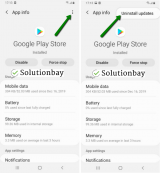
- Tap on OK to confirm;
- Open the Google Play Store app.
The video guide below shares how to uninstall updates (taken on a Samsung Galaxy device, running on Android OS 8 - steps may slightly vary from one device to another):
Note: Before updating the Google Play Store app, ensure that you are connected to a stable Internet connection, preferably a Wi-Fi one, to prevent errors.More infos
-
Restore your device to its factory settings
0(0)0(0)If the other solutions didn't work, consider resetting your device to its factory settings. This course of action will remove all the corrupt system files from your device, and replace them with clean files.
To reset your device to its factory settings, feel free to follow the steps below:
- Backup your device's data to any cloud storage service (e.g. to Google Drive);
- Go to Settings, tap on Reset and tap on the factory-reset option
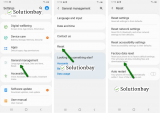
Feel free to watch the tutorial below, on how to reset your device (taken on a Samsung Galaxy device, running on Android 8 - the steps described may vary from one device to another):
Note: Make sure that your device is fully charged before resetting it to the factory settings, to avoid additional complications. Also, make a backup of your personal files (photos, videos, music, and other documents).
More infos

Login to Solutionbay
Join Solutionbay
Please click on the confirmation link we just sent you to
If you don’t receive the email in the next 2 minutes please check your junk folder, and add [email protected] to your safe sender list.