
How to fix the 400 Bad Request error
What is the cause of the 400 Bad Request error? How to fix it?
Every time we type a website URL, or click on a search result in Google, Yahoo, Bing, and other search engines, we request to pay a visit to a website, and then, if we are approved, we visit it. This process is measured in seconds. Unfortunately, there are times, when for various reasons, the website will notify us that a request is bad and show us a 400 error. This error can affect users on all devices, i.e. computers, smartphones, and tablets, on any known operating system (Windows, Mac, Ubuntu, Android, iOS, and others). No web browser is immune to this error, too (Mozilla Firefox, Google Chrome, Opera, Microsoft Edge, and others).
The most common reasons for this HTTP error can be split in two groups, client side, which is in your hands, and website side, which is out of your hands and can be fixed by the website developers only. The reasons are:
- The website itself;
- The Internet connection;
- The web browser;
- Corrupt cached data and cookies;
- Web browser extensions.
In order to fix this error, select the specifications that are applicable to you, read the solutions below, and follow the instructions carefully.
-
Fix spelling mistakes in the URL
0(0)0(0)The 400 Bad Request error can appear if the URL was written incorrectly (a spelling mistake has been made). for example, if you wrote google.comm instead of google.com, you would receive an error. Add adding extra space or character can qualify as a spelling mistake, too. In this case, the solution is simple, type the correct URL.
If you enter a URL manually, before hitting the Enter button, make sure that you typed the URL correctly.
More infos
-
Restart your web browser
0(0)0(0)Web browsers are far more complex than they seem. They are made of processes and tools working together synchronously to enable us browse the Internet smoothly. One of those processes failing can lead to this error. Restarting the web browser can also help you fix 400 Bad Request error. As browsers tend to run long hours, and we visit a wide variety of websites during the day, maybe one of them made a plugin on your web browser unresponsive, or a process got stuck. To make the plugin responsive again, and restart stuck processes, restart the web browser.
Close the web browser, wait for a couple of minutes, and open it again.
For more solutions on how to close or quit web browsers, check out the guide on how to close apps effectively.
More infos
-
Clear the web browser's cookies and cached data
0(0)0(0)When we visit a website for the first time, cookies and cached data are stored on our web browsers so that the next time we open the website, it will load faster. Even though cookies and cached data are meant to facilitate your web browsing experience, corrupt cookies and cache can do quite the opposite, one of the results being this error. What you need to do, to resolve the conflict is to clear the cookies and cached data, and start from scratch. Once the corrupt ones are cleared, the next time we visit a website, clean cookies and data will be stored to our web browser.
If you have never cleared the cache and cookies so far, check out the guides below, applicable to more web browsers, installed on computers, smartphones, and tablets.
More infos
Like Solutionbay?
Also check out our other projects :) See all projects -
Flush the DNS
0(0)0(0)The DNS (Domain Name System) settings are part of our ID that grants us access to browse the Internet. They are assigned to us, and managed automatically by the Internet provider we connect to. On our devices, they could be set to be managed automatically, or manually. If settings are managed manually, the margin for errors is greater than if the settings were managed automatically, as we will need to supervise if the settings are still valid.
If the error was caused by DNS settings, in order to fix it, you need to flush the DNS. Flushing the DNS is like clearing browser cookies and cached data, or unclogging a clogged pipe, but on a deeper level. Once cleaned, it many issues with Internet access, known and unknown, including the Bad Request - Invalid URL error will be resolved.
Note: If you have never flushed the DNS before, the how to flush the DNS guide can help you. Feel free to check it out.
More infos
-
Restart the router (and/or modem)
0(0)0(0)The router is the main Internet distributor in our household. From the wire it spreads it throughout the ether so that all our devices can connect to it via Wi-Fi. Maybe something went wrong with the router, and it cannot share Internet properly, resulting in the HTTP Error 400. It may have got stuck in a loop, after a minor Internet downtime, failing to reconnect to the Internet.
If the router is the cause of this error, you need to restart it, in order to fix the error. You can restart it effectively by power-cycling it (unplugging it from the power strip and plugging it back in after 5 minutes).
Note: If you use a modem, make sure to restart it, too, because it may be the culprit as well (it shares Internet to the router, or it has a Wi-Fi module you connect to).
More infos
-
Restart your computer
0(0)0(0)The operating system of our computer entails a great number of tasks and processes running in the background making it possible for us to use it. With so many processes in one place, errors are bound to happen. Maybe the computer itself is the reason for this error. Maybe a process got stuck, the network driver itself froze temporarily, or another program running on your computer became unresponsive and caused this issue - the reasons are far and wide. Restarting the computer is an easy way to fix many issues, one of them being this one.
For better results, you can "power-cycle" your computer. If you use a desktop computer, unplug it from the power strip and plug it back in after 5 minutes. If you use a laptop, remove its battery, and reinsert it after a minute, provided that the battery is removable.
More infos
-
Restart your smartphone/tablet
0(0)0(0)Restarting your smartphone or tablet is an easy way to address numerous problems, including Bad Request: Error 400. You will restart all the background processes and tasks that are running on your device in the background, some of which are part of the operating system, with their purpose being to make sure you can use your device seamlessly.
Restart it by pressing and holding the power button, and selecting the turn-off option. Wait for 5 minutes before turning your device back on.
More infos
-
Call your Internet Service Provider
0(0)0(0)Maybe the Internet service provider/carrier is the reason for this error. Sometimes, although extremely rare, some websites are inaccessible because they were blocked by the ISP, for a reason, or it's possible that there are service interruptions your ISP needs to address.
Contact the support team of your Internet Service provider, let them know you have issues accessing website, share the URL address(es) of the website(s) you can't visit, and they will guide you what to do. If the issue was caused by them, they will address it.
More infos
Like Solutionbay?
Also check out our other projects :) See all projects -
Update the computer's network driver
0(0)0(0)The task of the network driver is to bring your computer online by connecting your operating system with the network card and translating the instructions from one language into another. Outdated network driver can disrupt the communication, and cause the 400 error message, as the outdated driver won't recognize the latest online trends, or can misinterpret them.
Keeping up with the latest trends is the main reason why your computer's network driver has to be up to date. There are more ways to update a driver. You can push a button in the network driver's interface, or download and install the latest version of the driver, by going to the computer company's website. Or, you can update drivers through the Device Manager a Windows tool that lists all the hardware of your computer, and from where you can update any driver.
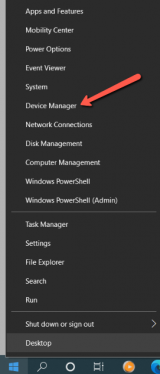
To update drivers through the Device Manager, follow the steps below:
- Right-click on the start menu and select Device Manager;
- Right-click the network driver, and select Update driver.
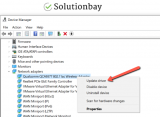
The how to download and install drivers guide can assist you, if you have never updated drivers before.
More infos
- Right-click on the start menu and select Device Manager;
-
Scan your computer for malware
0(0)0(0)Malware, often referred to as "viruses," can cause significant damage if they invade your system and there is no antivirus that can stop them along the way. If the system files in charge of the network connection, or the web browser were affected by the malware, many errors, including 400 bad request error can occur. Scanning your computer for malicious software, and removing malicious software from your computer should fix the issue, and remove this error. Open the antivirus software, and run a full system and file scan. It can last for hours, but it's worth it. Once viruses are found and removed this error shouldn't reappear.
Having an antivirus installed doesn't mean you are 100% protected against threats. New viruses are released on a daily basis and for a brief interval one may evade the defenses. To protect your computer and data against viruses follow the tips below:
- Stay away from suspicious websites;
- Don't open junk emails and pay close attention to the email address that sent the email to you (there are people impersonating Netflix, Amazon, and other websites just to steal your details, which can cost you a lot);
- Install programs downloaded from the developer's website, not from third-parties.
The virus removal and protection guide can teach you more about removing viruses and protecting your computer from future threats.
More infos
-
Deactivate or remove browser extensions
0(0)0(0)Browser extensions are meant to improve our browsing experience, but over time, if they get out of sync with the web browser's version, they can also cause errors like 400 Bad Request. Your first step should be to reveal what those extensions are and then to disable them. For this you need to disable extensions one by one, and restart the web browser every time you disable a browser extension. Once you have identified the browser extension causing this issue, you can keep it disabled until it's fixed by the person who developed it, or you can completely remove it from your browser.
Disabling and removing web browser extensions varies from one web browser to another. For example, if you use Google Chrome, to disable web browser extensions, follow the steps below:
- Click on the three-dot icon, then on More tools and select Extensions;
- Click on the activate/deactivate toggle in the extension box.
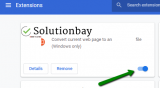
To remove an extension, you need to do the following:
- Click on the three-dot icon, then on More tools and select Extensions;
- Click on the activate/deactivate toggle in the extension box;
- Click on the Remove button.
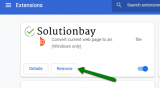
Feel free to check the how to enable/disable browser extensions guide, to learn how to disable browser extensions in different browsers, and the how to remove browser extensions guide, to remove extensions.
More infos
-
Change the DNS settings
0(0)0(0)DNS settings are a must if we wish to browse the Internet. Along with the IP address, they are part of our online ID. There are two ways to obtain these settings, automatic, and manual. If DNS settings are set to be obtained automatically, they are managed by the Internet provider you are currently connected to. If the DNS settings are obtained manually, then you as a user is in control of them. It's possible that your current settings became unresponsive, which is most likely the case if you obtain them manually, or there is a temporary issue with them, causing this error message.
In order to fix this error, you can update the current DNS settings. You can set to obtain them automatically, or manually.
If it's the ISP DNS settings that are the culprit, and you decide to obtain DNS settings manually, feel free to use Google's DNS settings:
For IPv4, use 8.8.8.8 and 8.8.4.4.
For IPv6, use 2001:4860:4860::8888 and 2001:4860:4860::8844.If you are not sure how to change the DNS settings, check out the how to change the DNS settings guide.
More infos
-
Change the proxy settings
0(0)0(0)With proxy settings in place you access the Internet as a different person, from another location. They can be compared to plane tickets. You can't board a plane unless you have valid tickets. It is possible that the proxy settings are the reason behind this error. To know this for sure, you can try disabling them first. If you use proxy using a software, disable it.
If the proxy settings were indeed the culprit, to fix this error, you need to use valid proxy settings. Access your device's proxy interface and enter valid proxy settings that are proven to work. Then, restart your device and check if you can recreate this error.
More infos
Like Solutionbay?
Also check out our other projects :) See all projects -
Use another web browser
0(0)0(0)Maybe the web browser itself may not be able to load the website properly for some reason. Try accessing the website from another web browser. If you could open it, then there is something wrong with your web browser. If none of the other solutions worked, consider using the web browser that can access the website.
More infos
-
Wait for an hour
0(0)0(0)Maybe the issue is the website you are trying to visit, itself. A surefire sign of this is you being able to open other websites, except that particular one you want to visit. Or, the ISP provider may experience temporary issues. In both these events, you will need to wait until the issue has been resolved. In most cases, an hour is enough for issues to be resolved. So, wait for an hour, and try opening the website again.
More infos
-
Contact the website's owners
0(0)0(0)Maybe it's the website you are trying to visit that is the reason behind this error. If you can access other websites, but not this one, this is very likely the case. Another way to check if a website is accessible, i.e. to ask for a second opinion is to go to downforeveryoneorjustme enter the website's URL, and see the results.
If the website doesn't load, and it has issues, contact the website's administrators, notify them about your finding, and wait until they resolve it.
More infos

Login to Solutionbay
Join Solutionbay
Please click on the confirmation link we just sent you to
If you don’t receive the email in the next 2 minutes please check your junk folder, and add [email protected] to your safe sender list.