
Don't know how to reset lost password
-
Use Skrill password reset tool
2(4)0(0)To reset your Skrill password, follow these steps:
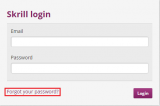
- Go to the Skrill login page.
- Click on the Forgot your password hyperlink.
-
On the next page you will have to write down the email address linked with your Skrill account and use it to reset the password. You will get a password reset link so read the steps briefly.
More infos
-
Use Skype password reset tool
0(0)0(0)To reset your Skype password, follow these steps:
- Go to the Skype web page. Click on the Sign In button.
- Click the "Problems Signing In?" hyperlink.
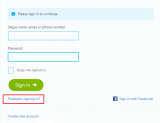
- On the next page, enter the e-mail address your Skype account is linked with.
- Go check your e-mail, there should be a link (ussually instantly) which will lead you to a password reset page. Click it.
- Choose a new password and save it.
More infos
- Go to the Skype web page. Click on the Sign In button.
-
Use Facebook password reset tool
0(0)0(0)To reset your Facebook password, follow these steps:
- On the Facebook webpage, click the Forgot your password hyperlink.

- Follow the steps from there, you'll have to enter the email address you use to log into Facebook.
- After you complete the steps, check your email address, the link for password reset should be there, if it's not, wait a little or check the spam folder.
More infos
Like Solutionbay?
Also check out our other projects :) See all projects - On the Facebook webpage, click the Forgot your password hyperlink.
-
Use Gmail password reset tool
0(0)0(0)To reset your Gmail password, follow these steps:
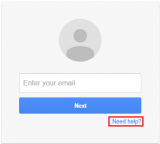
- On the Gmail webpage, click the Need Help? hyperlink.
-
Read every line briefly and follow the steps from there, if you have an Android device linked with your account you can use it to reset your password, otherwise you'll have to answer a security question or reset the password using and alternative email address.
More infos
- On the Gmail webpage, click the Need Help? hyperlink.
-
Use Yahoo password reset tool
0(0)0(0)To reser your password, go to the Yahoo webpage.
-
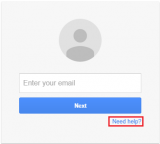
Click the Need help? hyperlink.
-
Click on the I don't remember my password hyperlink.
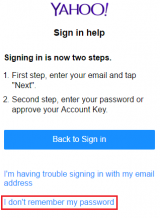
- Read the steps briefly, you'll have to answer a security question or reset the password using and alternative email address.
More infos
-
-
Use Steam password reset tool
0(0)0(0)To reset your Steam password, follow these steps:
- Go the the Steam webpage.
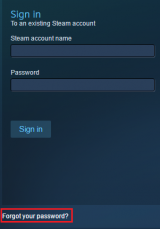
- There, enter the email address linked to your account and follow the steps shown, you'll have to reset the password using the link to your email from steam.
More infos
- Go the the Steam webpage.
-
Use Reddit password reset tool
0(0)0(0)To reset your Reddit password, follow these steps:
- On the Reddit webpage, click the reset password hyperlink in the login form.
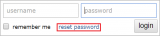
- On the next page, write your Reddit username and you will an email explaning you how to reset your password, follow the steps.
More infos
- On the Reddit webpage, click the reset password hyperlink in the login form.
-
Use PayPal password reset tool
0(0)0(0)To Reset your PayPal password, follow these steps:
- Go the the PayPal login page.
-
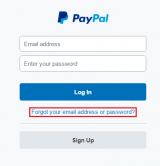
Click on the Forgot your email address or password hyperlink.
-
Follow the remaining steps, you should be able to reset your password using the email link associated with your account or by answering the security questions.
More infos
Like Solutionbay?
Also check out our other projects :) See all projects -
Use Amazon password reset tool
0(0)0(0)To reset your Amazon password follow these steps:
- On the Amazon webpage, click the Your Amazon.com hyperlink.

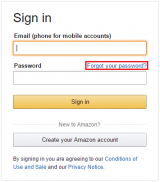
- On the login page click the Forgot your password? hyperlink.
-
Follow the remaining steps, you can use your phone number if it's linked with the account or the email address, read the steps briefly.
More infos
- On the Amazon webpage, click the Your Amazon.com hyperlink.
-
Use eBay password reset tool
0(0)0(0)To reset your eBay password follow these steps:
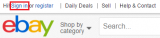
- On the eBay webpage click on the click the Sign in hyperlink
-
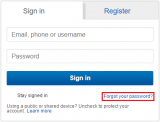
On the next page, click the Forgot your password? hyperlink.
-
Follow the remaining steps, you'll need to access the email address linked with your eBay account to reset the password.
More infos
- On the eBay webpage click on the click the Sign in hyperlink
-
Use Twitter password reset tool
0(0)0(0)To reset Twitter password follow these steps:
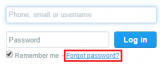
- On the Twitter webpage click the Forgot password? hyperlink.
-
Follow the steps, you'll need to enter your phone number or the email address linked with your Twitter account to reset the password.
More infos
- On the Twitter webpage click the Forgot password? hyperlink.
-
Use Linkedin password reset tool
0(0)0(0)To reset your Linkedin password follow these steps:
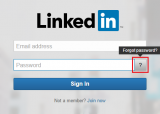
- On the Linkedin webpage click on the question mark button.
-
On the next page, type in your email address linked with your Linkedin account and follow the steps requierd to reset your password.
More infos
- On the Linkedin webpage click on the question mark button.
-
Use Instagram password reset tool
0(0)0(0)To reset your Instagram password follow these steps:
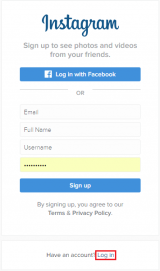
- On the Instagram webpage click the Log In hyperlink first.
- Then click the forgot hyperlink in the password field.
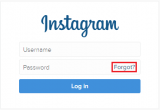
- On the next page, follow the steps required to complete your password reset process.
More infos
Like Solutionbay?
Also check out our other projects :) See all projects - On the Instagram webpage click the Log In hyperlink first.
-
Use Youtube password reset tool
0(0)0(0)Since Youtube is one of the Google's services, it uses the same account (Gmail).
More infos
-
Use Netflix password reset tool
0(0)0(0)To reset your Netflix password follow these steps:
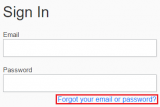
- On the Netflix login page click the Forgot your email or password? hyperlink.
-
Follow the steps required to reset your password, you'll need to access the email address linked with your Netflix account.
More infos
- On the Netflix login page click the Forgot your email or password? hyperlink.
-
Use Tumblr password reset tool
0(0)0(0)To reset your Tumblr password follow these steps:
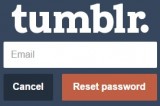
- On the Tumblr password reset page write down your email address linked with your tumblr account and press the Reset password button.
-
Follow the steps required to reset your Tumblr password.
More infos
- On the Tumblr password reset page write down your email address linked with your tumblr account and press the Reset password button.
-
Use Dropbox password reset tool
0(0)0(0)To reset your Dropbox password follow these steps:
- On the Dropbox webpage click on the sign in
 button in the upper right corner.
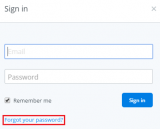
 - In the pop-up dialog click on the Forgot your password? hyperlink.
-
Follow the steps required to reset your password, you'll need to access the email linked with your Dropbox account.
More infos
- On the Dropbox webpage click on the sign in
-
Reset Windows XP password through Safe Mode
0(0)0(0)To enter safe mode press F8 repeatedly while Windows is booting (the computer is turning on). There, you will be given a list of choices to choose from. Using the arrow keys, navigate to "Safe Mode".
Once in the Safe mode, click Start and go to Control Panel. Select the account you've lost your password to and select Change/Remove the password. Reboot your computer.
More infos
Like Solutionbay?
Also check out our other projects :) See all projects -
Reset Windows XP password using bootable CD/USB
0(0)0(0)Check the solutions on how to make a bootabile CD/USB.
Check the solutions on how to make a CD-Drive/USB be a primary boot device.Once you've made a bootabile CD/USB with Windows XP on it, put it in your computer. Reboot the computer and then press any key for it to boot.
- The blue screen titled Windows XP Setup should appear, press Enter.
- On the next screen, press R.
- Press Shift and F10 simultaneously, when the screen reads Installing Devices.
- Type NUSRMGR.CPL and press Enter. It will open Control Panel, there, select the account you've forgot a password to and select Change/Remove password. Reboot your PC.
More infos
-
Reset Windows 7 password using a bootable CD/USB
0(0)0(0)Check the solutions on how to make a bootabile CD/USB.
Check the solutions on how to make a CD-Drive/USB be a primary boot device.Once you've made a bootabile CD/USB with Windows 7 on it, put it in your computer. Reboot the computer and then press any key for it to boot.
More infos
-
Reset Windows Vista password using a bootable CD/USB
0(0)0(0)Check the solutions on how to make a bootabile CD/USB.
Check the solutions on how to make a CD-Drive/USB be a primary boot device.Once you've made a bootabile CD/USB with Windows XP on it, put it in your computer. Reboot the computer and then press any key for it to boot.
More infos
-
Reset Windows 8 password with iSunshare
0(0)0(0)Check the solutions on how to make a bootabile CD/USB.
Check the solutions on how to make a CD-Drive/USB be a primary boot device.Download iSunshare Windows Password Genius Advanced. Once you've made a bootabile CD/USB out of it reboot the computer and then press any key for it to boot.
More infos
-
Reset Windows 10 password using a bootable CD/USB
0(0)0(0)Check the solutions on how to make a bootabile CD/USB.
Check the solutions on how to make a CD-Drive/USB be a primary boot device.Once you've made a bootabile CD/USB with Windows 10 on it, put it in your computer. Reboot the computer and then press any key for it to boot.
More infos
Like Solutionbay?
Also check out our other projects :) See all projects -
Backup and reinstall operating system
0(0)0(0)One of the easiest ways to reset your password would certainly be to reinstall your operating system all together. See the solutions on how to backup your files and then the solutions on how to reinstall your operating system.
More infos
-
Check these solutions
0(0)0(0)Check the solutions on how to open a password protected file.
More infos
-
Use recovery mode
0(0)0(0)If you forgot your iPhone password you'll have to use the recovery mode. It will erase it's password but all of data on it as well, so make sure you've made a backup.
- Connect your iOS device to a computer and open iTunes.
- Hold down Sleep/Wake and Home button simultaneously until you see a recovery mode screen (It's a Note with little iTunes label beneath it, so don't release the buttons when you see Apple logo)
- On your computer there'll be a pop-up screen with a Restore and Update options, select Restore.
- Wait for it to finish and your device is reset.
More infos
-
Factory reset your device
0(0)0(0)More infos

Login to Solutionbay
Join Solutionbay
Please click on the confirmation link we just sent you to
If you don’t receive the email in the next 2 minutes please check your junk folder, and add [email protected] to your safe sender list.