
How to fix the 401 unauthorized error
What does 401 unauthorized error mean? How to fix it?
This error means that you won't be able to load the page you were trying to visit, unless you provide a valid username and password.
This error code is accompanied by one of the following error messages:
- 401 Unauthorized;
- 401 Authorization Required;
- HTTP Error 401 - Unauthorized
The most common reasons for this error, aside from entering the wrong username and password include:
- The web browser itself;
- Corrupt cached files and cookies;
- The website itself (e.g. wrong URL redirection).
The solutions listed below will show you how to fix this error, on your Windows PC or Mac computer, as well as Android (Samsung, Huawei, Xiaomi) or iOS (iPhone, iPad, iPod touch) smartphone or tablet. Check them out.
-
Ensure that you have entered the correct URL address
0(0)0(0)One of the main reasons for 401 Unauthorized error is wrongly entered URL address in the web browser. If you have omitted a letter, or added an extra period (.) in the URL you won't be able to access the website you desire. Verify that you have entered the correct URL address in the address bar, and try loading the website again.
More infos
-
Reload the website
0(0)0(0)Reloading the website may help you fix this authorization error, as the website may have become unresponsive at the time, for some reason. You can reload the website through the browser's refresh button and try again. Alternatively, you can close the current tab and open the website in a new tab, or even close the web browser, and open it again.
More infos
-
Clear the web browser's cache and other browsing data
0(0)0(0)Corrupt cookies or cached data may be responsible for many errors, among which the 401 Unauthorized error message. In order to fix this error message, had it been caused by corrupt cookies or cached data, you need to clear the cookies, cached data, and other data, so that new ones that are not corrupt are placed on your device.
You may discover more details on how to clear the browser's cache (and cookies) specific to your web browser, via the how to clear the browser cache guide and how to delete browser cookies guide.
More infos
Like Solutionbay?
Also check out our other projects :) See all projects -
Contact the Internet Service Provider/Carrier you are subscribed to
0(0)0(0)Maybe there are technical issues on the end of the Internet Service Provider (ISP) or the carrier (if you use mobile data) you are subscribed to that cause this error message. For example, maybe there is a malfunction in the network of the provider, or a scheduled maintenance is being carried out.
Contact the support team of the ISP provider/carrier, inform them about the error message, share the URL address of the website(s) you can't visit, and they will instruct you on the next steps you need to take.
More infos
-
Contact the website administrator(s)
0(0)0(0)Another reason for this authorization error message is a glitch on the website you are trying to visit. If this is the case, there is nothing else you can do but contact the website administrators, and let them know of this issue. You won't see this error once the issue is resolved.
More infos
-
Remove the website from the list of blocked websites in your firewall or antivirus
0(0)0(0)It is possible that for some reason (usually a security one) the website you are trying to visit has been blocked by the firewall or antivirus.
To verify if this is the case, open the firewall or antivirus settings and check if you can see the website's URL on a list of blocked websites. If it was on the list, you should remove it from the list of blocked websites, after which you should be able to access the website.
Note: If you are not sure where to find a list of blocked websites, feel free to contact support or search for manuals online.
More infos
-
Disable or remove browser extensions
0(0)0(0)Maybe it's a browser extension that is the reason behind error 401. Browser extensions that don't work properly can cause many issues in your web browser. In this case, firstly you would need to disable extensions one by one, reloading the web browser and website every time you disable a browser extension, until you identify the bad one. Once you have identified the browser extension bad browser extension, you can either try fixing the extension or completely remove it from your browser.
If you use Google Chrome, to disable web browser extensions in Google Chrome, feel free to follow the steps below:
- Click on the three-dot icon, select More tools and click on Extensions;
- Click on the activate/deactivate toggle in the extension box.
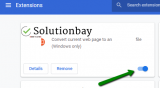
If you want to remove an extension, then:
- Click on the three-dot icon, select More tools and click on Extensions;
- Click on the activate/deactivate toggle in the extension box;
- Click on the Remove button.
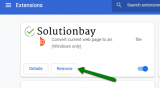
If you use another web browser (Mozilla Firefox, Opera, and others), feel free to check the how to enable/disable browser extensions guide, to disable extensions, and the how to remove browser extensions guide, to remove extensions.
More infos
-
Use another web browser
0(0)0(0)Although very rare, and next to impossible, maybe the current browser you are using is the reason behind this error. If this is the case, and if none of the other solutions worked, consider using another web browser.
More infos
Like Solutionbay?
Also check out our other projects :) See all projects

Login to Solutionbay
Join Solutionbay
Please click on the confirmation link we just sent you to
If you don’t receive the email in the next 2 minutes please check your junk folder, and add [email protected] to your safe sender list.