
How to fix Printer not activated error code −30 in Windows (Nothing else worked)
What are the reasons for the Printer not activated error code 30? How to fix it?
This printing error occurs when your printer is unable to print the file you selected for printing. The reasons for this error include:
- Outdated printer drivers;
- Damaged drivers;
- Bad connection between the printer and the computer;
- Malicious software;
- Outdated operating system.
The solutions listed below reveal how you can fix this error, safely. All you need to do is to follow the instructions.
-
Reinstall the printer driver
0(0)0(0)If nothing else worked, reinstalling the printer's driver may be the only way to fix the printer error. By reinstalling the driver, the current files will be removed and fresh and up-to-date files will be placed instead.
To reinstall the printer driver, follow the steps below:
- Go to the start menu, type Printers and Scanners or Devices and Printers and click on Printers and Scanners or Devices and Printers, once it appears in the search results;
- Click on the printer entry and then select Remove Device;
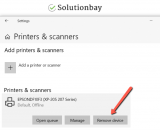
- Install the printer's driver (preferably the latest version), by downloading it from the printer manufacturer's website.
More infos
-
Take your printer to a repair shop
0(0)0(0)If none of the other solutions worked, consider taking your printer to a repair shop, as it may have malfunctioned. Take it to authorized repair shops only, as they have the necessary equipment and skills needed for fixing the printer.
More infos

Login to Solutionbay
Join Solutionbay
Please click on the confirmation link we just sent you to
If you don’t receive the email in the next 2 minutes please check your junk folder, and add [email protected] to your safe sender list.